

 Ideas
•
Let the child put the Numberjacks on the either or both of the tables and talk about the way the number on the
display and the countable dots change. Can they predict what will happen if you change the Numberjacks?
•
You can set your child challenges to make a particular number, such as their favourite number or their age.
Can they find different ways to do this using one or more of the Numberjacks?
•
Switch off the ‘total’ display (the upper eyes) and get your child to predict the total in advance.
•
Switch off the spoken total and get your child to say the total being made.
•
If you have a dice, can your child find the Numberjacks that have the same patterns of countable dots as the spots
on the dice? Which Numberjack has the same number of dots but in a different pattern?
•
What is the largest number they can make using one Numberjack? Using two Numberjacks? Using three?
•
Use the target total with the sound on and the total showing so that your child can see and hear the numbers they
make. Then try to make the target number with the total and/or the sound turned off. You can show or hide the
countable dots at any time to help.
•
What numbers do you get if you put matching Numberjacks on two of the tables? e.g. 1 and 1, 2 and 2 and so on?
What if you put matching Numberjacks on all three tables? e.g. 1 & 1 & 1, 2 & 2 & 2 and so on?
•
What numbers do you get by using two Numberjacks that are next to each other like 0 and 1, 1 and 2 and so on?
What if you use three Numberjacks that are next to each other like 0 & 1 & 2, 1 & 2 & 3 and so on?
•
Can you make all the totals from 1 to 10?
Which of the totals from 1 to 10 can you make using two Numberjacks for each number? Using three?
•
Use the sound to listen to various counts:
Can you make the total speak the numbers 1 to 10 in order? What about 1 to 20?
Can you make it count down from 10 to 0? From 20 to 0?
Can you make it count in twos?
Calculator
On the screen
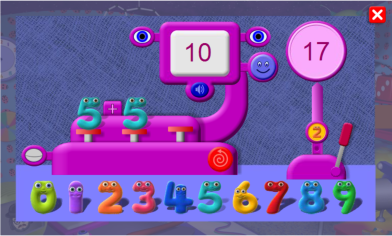
The Calculator gives children experience of addition by allowing them to play with the
numbers and see their totals both as numerals and as countable dots.
The process can be made more or less challenging by switching various elements on and
off: the ‘countable’ dots, the sound, and the display of the total.
Ideas
•
Let the child put the Numberjacks on the either or both of the tables and talk about the way the number on the
display and the countable dots change. Can they predict what will happen if you change the Numberjacks?
•
You can set your child challenges to make a particular number, such as their favourite number or their age.
Can they find different ways to do this using one or more of the Numberjacks?
•
Switch off the ‘total’ display (the upper eyes) and get your child to predict the total in advance.
•
Switch off the spoken total and get your child to say the total being made.
•
If you have a dice, can your child find the Numberjacks that have the same patterns of countable dots as the spots
on the dice? Which Numberjack has the same number of dots but in a different pattern?
•
What is the largest number they can make using one Numberjack? Using two Numberjacks? Using three?
•
Use the target total with the sound on and the total showing so that your child can see and hear the numbers they
make. Then try to make the target number with the total and/or the sound turned off. You can show or hide the
countable dots at any time to help.
•
What numbers do you get if you put matching Numberjacks on two of the tables? e.g. 1 and 1, 2 and 2 and so on?
What if you put matching Numberjacks on all three tables? e.g. 1 & 1 & 1, 2 & 2 & 2 and so on?
•
What numbers do you get by using two Numberjacks that are next to each other like 0 and 1, 1 and 2 and so on?
What if you use three Numberjacks that are next to each other like 0 & 1 & 2, 1 & 2 & 3 and so on?
•
Can you make all the totals from 1 to 10?
Which of the totals from 1 to 10 can you make using two Numberjacks for each number? Using three?
•
Use the sound to listen to various counts:
Can you make the total speak the numbers 1 to 10 in order? What about 1 to 20?
Can you make it count down from 10 to 0? From 20 to 0?
Can you make it count in twos?
Calculator
On the screen
The Calculator gives children experience of addition by allowing them to play with the
numbers and see their totals both as numerals and as countable dots.
The process can be made more or less challenging by switching various elements on and
off: the ‘countable’ dots, the sound, and the display of the total.
 Level 0
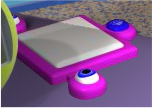
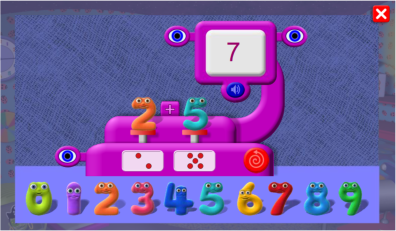
The upper eyes turn on or off the display of the total.
The loudspeaker turns on or off the voicing of the total.
The Numberjacks are placed on the red tables to add
them. Dragging a new Numberjack to a table that
already contains a Numberjack will swap them and
update the total.
The lower eye turns on and off the display of the
countable dots.
The swirly arrow resets the calculator.
Level 0
The upper eyes turn on or off the display of the total.
The loudspeaker turns on or off the voicing of the total.
The Numberjacks are placed on the red tables to add
them. Dragging a new Numberjack to a table that
already contains a Numberjack will swap them and
update the total.
The lower eye turns on and off the display of the
countable dots.
The swirly arrow resets the calculator.


 Level 1
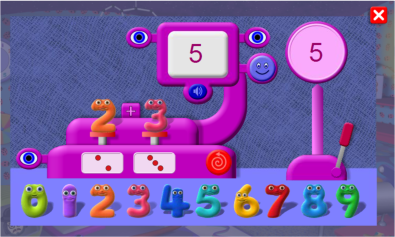
Clicking the target gives a number for the child to try to make.
Clicking the smiley tells them whether or not they have
matched the target number, which is most useful when the
total is hidden and unvoiced.
Clicking the lever resets the target number.
Level 2
There are three tables for the Numberjacks so that you can
add together three numbers.
Clicking the small Numberjack on the target’s stand selects
a target number form a smaller or higher range.
Level 1
Clicking the target gives a number for the child to try to make.
Clicking the smiley tells them whether or not they have
matched the target number, which is most useful when the
total is hidden and unvoiced.
Clicking the lever resets the target number.
Level 2
There are three tables for the Numberjacks so that you can
add together three numbers.
Clicking the small Numberjack on the target’s stand selects
a target number form a smaller or higher range.